SOP #: | 212 |
| Prepared by: | Samuel Labastille |
Revision Date: | 1/16/26 |
| Approved by: | A. Griffith |
Purpose/Summary Statement:
Provision access to end-users to the Freshdesk Customer Portal used to manage helpdesk tickets from the customer’s point of view.
Scope
This applies to all Milrose Employees.
Procedure:
- Sign into Freshdesk
- Confirm with manager if admin access is not available.
- Go to Customers > Contacts on the left hand side
- Customers will be represented by the third option on the left-hand side
- Search up the user’s name
- If the user’s contact does not exist, create the account using the steps below
- At the top right of the screen select New - Contact
- Fill out the form below with the highlighted fields
- If the user’s contact does not exist, create the account using the steps below
- Select Create Contact at the bottom right of the screen
- Click on the user’s name and select “Send Activation Email
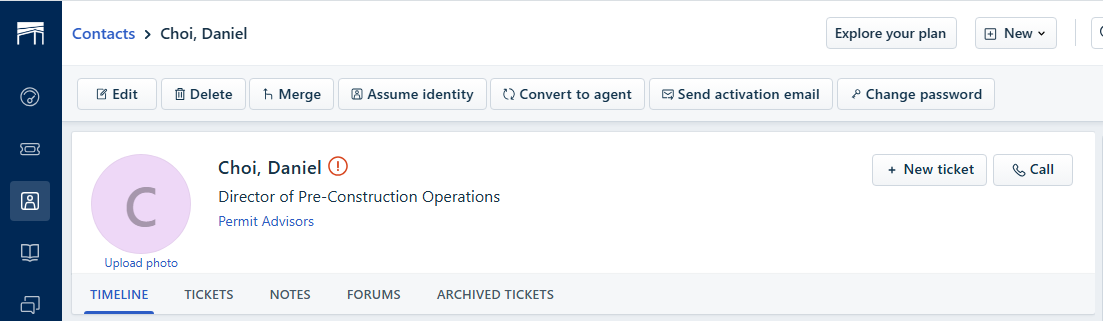
- Advise the end user that they will receive an email like the one below
- Have the user click the activation link and fill out the form below
- Provide the link below to the user to access the Freshdesk Portal to:
- Create new tickets
- View/Manage Existing tickets
Accounts / Access:
To perform the steps in this SOP you will need a Freshdesk Administrator Access
Was this article helpful?
That’s Great!
Thank you for your feedback
Sorry! We couldn't be helpful
Thank you for your feedback
Feedback sent
We appreciate your effort and will try to fix the article