If you have made an error billing from a "Bill Completed Services" task you may edit your entry at any time before an invoice is generated for the entry. An error message will be shown if the entry has already made it to an invoice. In that case you will need to get in touch with the project's A/R Coordinator to kick off the process of correcting the invoice.

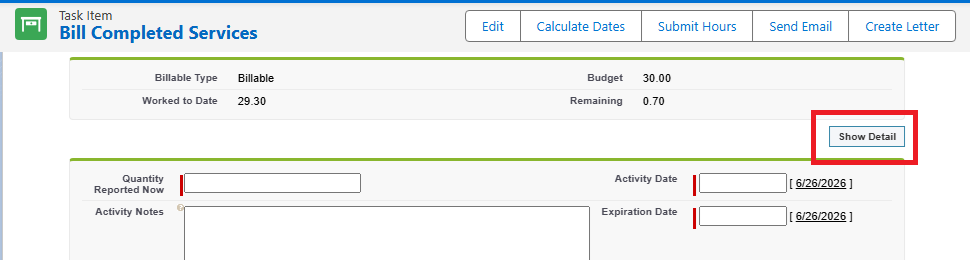
Navigate to the "Bill Completed Services" task where the record was created and click "Show Detail".
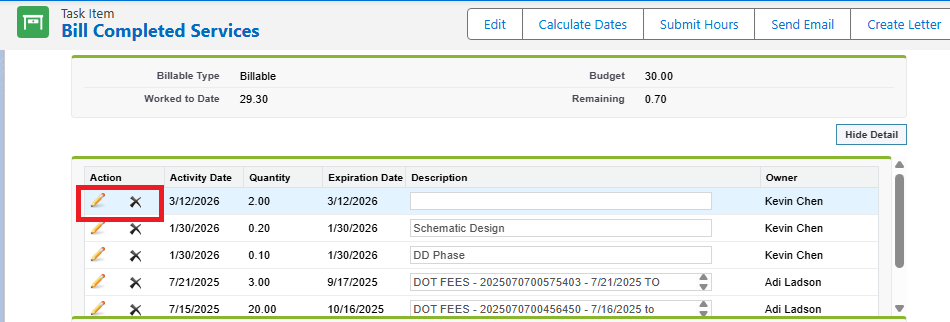
The pencil icon next to an entry allows you to edit the date, quantity, expiration date (if applicable) and/or description. The X icon will delete the line.

Was this article helpful?
That’s Great!
Thank you for your feedback
Sorry! We couldn't be helpful
Thank you for your feedback
Feedback sent
We appreciate your effort and will try to fix the article