
If you receive an error stating "Maximum view state size limit (170KB exceeded)" when attempting to get into the Proposal Wizard there are some settings that can hide some things in the Proposal Wizard to free up view state. The actual limit is a hard limit enforced by Salesforce and cannot be changed. This is a limit put in place to ensure fair access to resources on the Salesforce platform across their customer base.
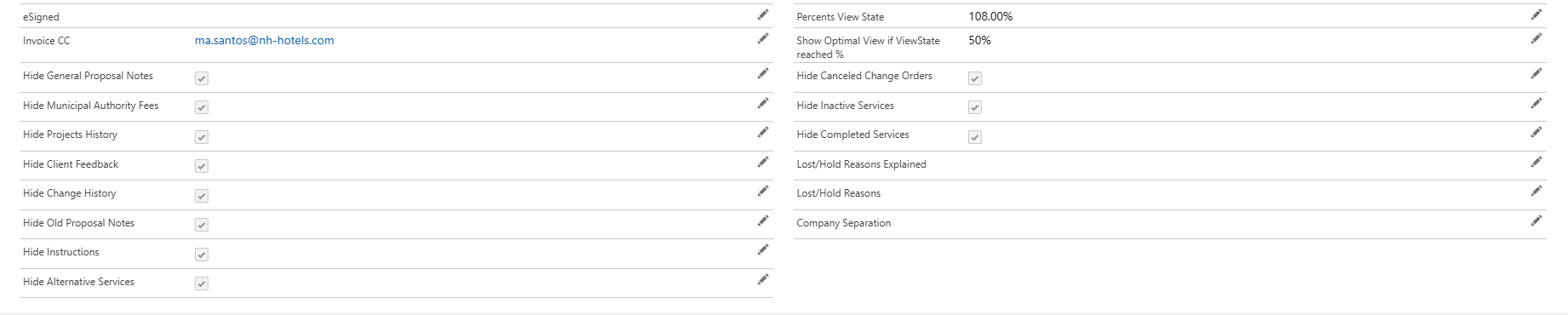
Navigate to the proposal's detail page. The "Percents View State" field shows the last status of the view state before we were unable to get back in. This value updates when the wizard is opened and cannot update when the error is triggered. Note that this value goes slightly over 100%. This was a failed attempt to have users be more attentive to the view state and take appropriate action sooner as they approach the limit.
First review the "Show Optimal View if ViewState reached %" field. A normal proposal has this value set to 95%. Once it hits 95% it should automatically be set to 50%and prompt the user to select items to hide in the Wizard. If users are getting the error and it is still set to 95% then they made a single large update to the proposal that took them over the 170KB limit without triggering the automated response to approaching the view state limit. You should change the value in the field to 50% in that case.
Select categories of things to hide by checking the "Hide ..." checkboxes. The Hide Inactive Services and Hide Completed Services checkboxes will do the most to limit view state usage, but the other checkboxes will reclaim a smaller amount. If all the boxes are checked and the Show field is set to 50% then that's all that can reasonably be done. Users will have to complete services before the Wizard becomes accessible again. The only other way to regain access is to start deleting records and that will not get them back in the wizard for long if they start adding more services and change orders. The SOP is to start a new proposal as you approach the limit the second time.
Was this article helpful?
That’s Great!
Thank you for your feedback
Sorry! We couldn't be helpful
Thank you for your feedback
Feedback sent
We appreciate your effort and will try to fix the article