Users should be encouraged to roll back their own services when possible. A service or task's owner, an assigned production manager or the person who completed a task on the service may roll back the status. This can be done as long as any billing associated with the task has not been invoiced.
To roll back a service's tasks:
First ensure that the Project's Project State is set to In Process. If the last service of a project has been completed the Project State may automatically roll over to Complete. If it is Complete, move it back to In Process.
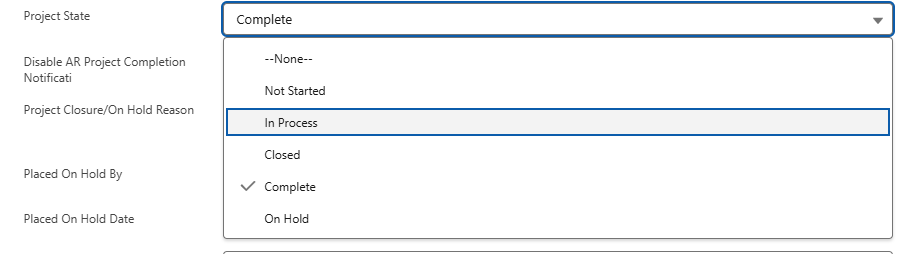
Next, open the service and open the last task completed. This should be done in reverse order.

Tasks can have different statuses depending on the task type. Move the status from whatever the completed status is to a started status (in the screenshot below from Activity Completed to Activity in Process). Optionally- you can move it back to Not Started after moving it to the started status if the task has not been started.
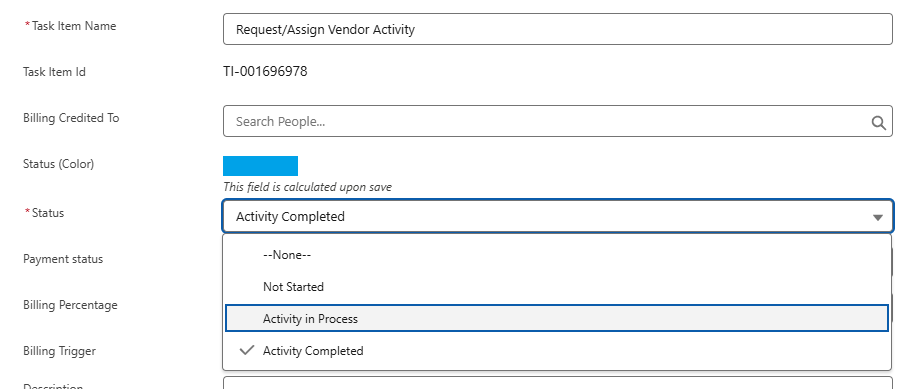
Depending on the specific request you may have to move on to the previous task and repeat the step above.

Some tasks are billing triggers with an associated percent. In this example the first task we rolled back (Sequence# = 2) was a 50% billing trigger. If the request was only to roll back the 50% billing then stop at that task. If We need to roll back the whole 100% continue to the other task.
*If an admin is performing this please read below about checking if the task's billing is already on an invoice before proceeding with this step.
*If billing is being done in Asana the associated milestones over there should also be rolled back by the PM.
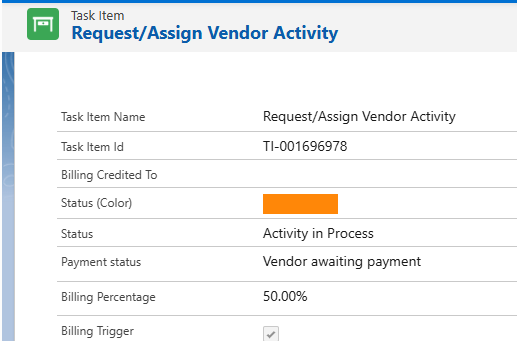
If a task's billing is already on an invoice:
Non-admin Users will receive a notification to that effect and be blocked from rolling the task back. If it was invoiced in error accounting needs to be notified to correct (credit) the invoice. Once the invoice is credited and admin can roll the task(s) back so that the billing can be triggered in the future.
If an admin is performing the roll-back check the Billing Line Items related list for the task item. If the Billing Line Item has a Pro-forma Invoice associated with it it has been invoiced and accounting will need to be looped in to handle the credit.

Was this article helpful?
That’s Great!
Thank you for your feedback
Sorry! We couldn't be helpful
Thank you for your feedback
Feedback sent
We appreciate your effort and will try to fix the article